Connect GitHub
Use your Devghouse GitHub connection, or connect it from the sell wizard first.


Solana escrow · GitHub sales · CV onboarding
Fund a job in USDC, SOL or DGH and release it only when you approve. Get hired with a profile that fills itself from your CV. Sell a GitHub repository buyers receive in their own repo.
One account, every side of the deal
Every path ends in the same place: a contract or a purchase paid on Solana. One DevGhouse account keeps your profile, team, contracts, purchases and wallet together.
01 / Hire talent
Compare real people and teams by their services, past work and rates. Send an offer, fund the milestone in USDC, SOL or DGH, and the money waits in Solana escrow until you approve the delivery.
Browse talent by category
02 / Buy finished code
Working software, templates and source code with a price and a live preview. Pay in crypto and receive the code as an encrypted download or pushed straight into your own private GitHub repository.
03 / Find work
Open briefs with budget, pay type and a crypto or fiat filter. Apply in a few clicks, track every proposal, or post a job when you are the one hiring.
No jobs posted yet
Check back later for new opportunities
04 / Sell a GitHub repo
Connect GitHub, pick the repository, set a price. Every buyer gets a fingerprinted copy, as a download or a private repo of their own, and you get paid in crypto. Your code never leaves your account.
Use your Devghouse GitHub connection, or connect it from the sell wizard first.
Import the code you want to package without moving it out of your account.
Add the product page, price, files, and delivery terms.
Buyers pay in crypto and receive a fingerprinted copy as a download or a private repo.
05 / Public pages
Publish as yourself, a business, or a shared space. Add services, products, work, a gallery, contact details, testimonials, teammates, and booking links without mixing personal and team data.
Your work, services, products, proof, and contact path.
/u/your-nameA company page with its own team, brand, offers, and inbox.
/r/your-businessA shared realm for a studio, community, venue, or working group.
/r/your-space06 / Set up with your CV
Upload a CV and your name, headline, bio, skills and experience fill in for free. Then the Claude or ChatGPT you already pay for writes your services and gallery on your own subscription, with no DevGhouse credits. You review every field before anything goes live.
Four simple steps
Create a job, or publish your services, portfolio, and finished products.
Choose fixed milestones for a result or hourly work with tracked time and weekly timesheets.
Deliverables, time records, messages, approvals, and disputes stay tied to the same agreement.
The buyer approves the milestone or timesheet and the escrow releases on Solana, checkable on-chain.
Built on Solana
Sign in with a wallet through Privy, approve payments in Phantom, pay and get paid in SOL, USDC or DGH, sell straight from GitHub and set up with the Claude or ChatGPT you already use.
Web3 sign-in for the marketplace account.
Approve supported Solana wallet actions directly.
Shared wallet payment choices for contracts and purchases.
Let visitors book a meeting from a public profile.
A believable contract
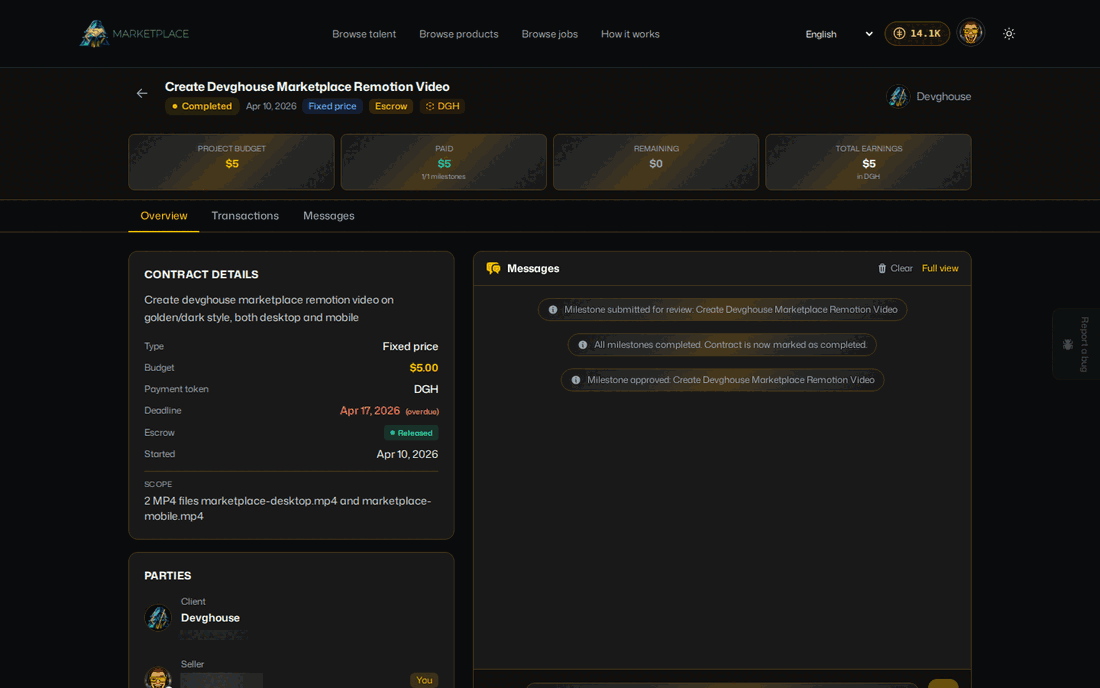
A client can hire for one milestone or by the hour. The seller submits delivery or tracked time, the client reviews it, and the approved amount releases through the contract payment rail.
What's included
Clear before you join
Browsing is public. The live settings decide the seller access path and the credit cost of actions such as posting a job, sending an offer, or submitting a proposal.
Seller access
$25
Includes 2,500 credits
$1 adds 100 credits
See the current access pathCommon questions
Fixed milestone and approved hourly payments use an on-chain payment trail, so the release can be checked outside the marketplace interface.
Yes. A realm is a separate team or business context that can keep its jobs, profile, and marketplace activity apart from your personal account.
Not necessarily. The operator controls the current access mode. The live pricing section and onboarding path show whether access is free, fee-gated, or sign-in only.
Reading your CV is free. Sellers connect their own Claude or ChatGPT, which writes services and gallery on that subscription, so DevGhouse bills no credits for it and never trains on your data. Hiring and buying need no AI at all.
Connect GitHub, pick a repository and set the price. Each buyer receives a fingerprinted copy as an encrypted download or pushed into their own private repository.
Yes. Some product listings are complete working software delivered as a purchase rather than a contract for hours.
Marketplace wallet paths support SOL, DGH, and USDC. Phantom is available for supported direct Solana actions.
No. One DevGhouse account can browse, hire, sell, and switch between personal and team contexts.
Choose your door
Talent, products and jobs are public to browse. Sign in when you want to hire, apply, sell or publish your page.